OpenMenu NX
Your personal macOS menu — right where you need it.

OpenMenu NX brings applications, files, folders, URLs, scripts, macOS services and important actions directly to your mouse pointer.
Instead of clicking your way through Finder windows, the Dock and menu bars, you can create your own custom menu and open it at any time using a keyboard shortcut, mouse action, menu bar icon or macOS service.
OpenMenu NX combines fast access with flexible automation and can be tailored precisely to your personal workflow. Menu items can react to the current selection, specific file types or the currently active application. This way, the menu only shows what you actually need at that moment.
The Story Behind OpenMenu NX
OpenMenu NX is based on OpenMenu X, whose development was discontinued in 2014. The NX version continues the original concept for current macOS versions, modernizes the application and expands it with features such as a Clipboard Manager, Bash support, modern selection and visibility rules, and numerous new configuration and automation options.
Key Features
- Fully customizable menu for applications, files, folders, URLs, macOS services, AppleScript and Bash scripts
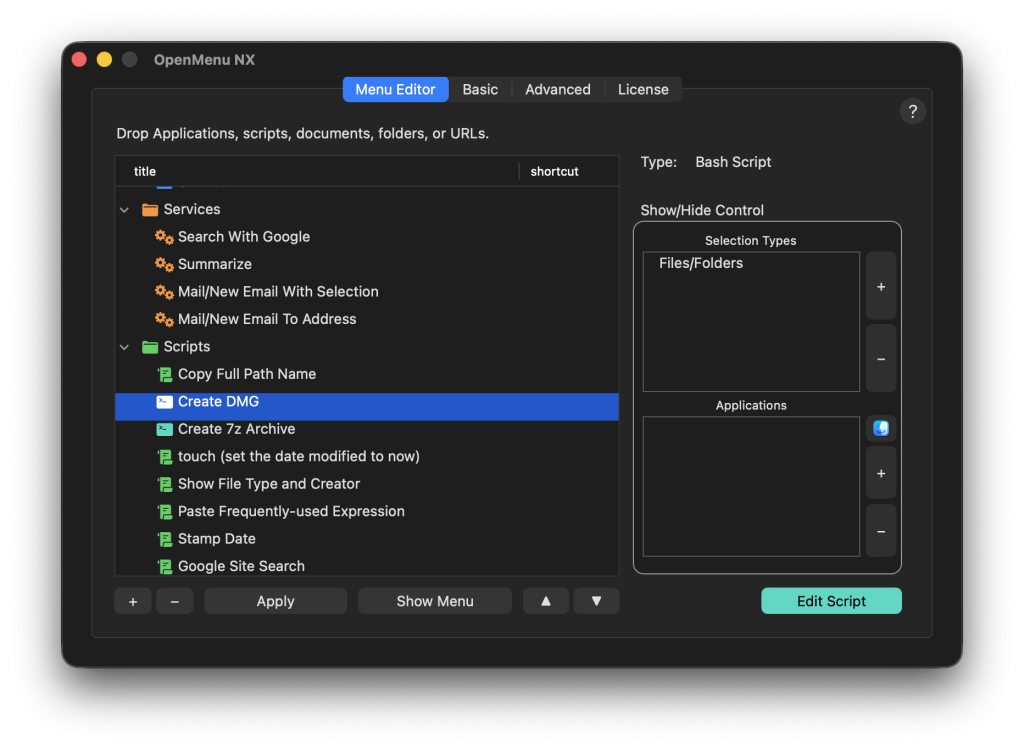
- Easily add, sort and organize menu items into groups or submenus using Drag & Drop
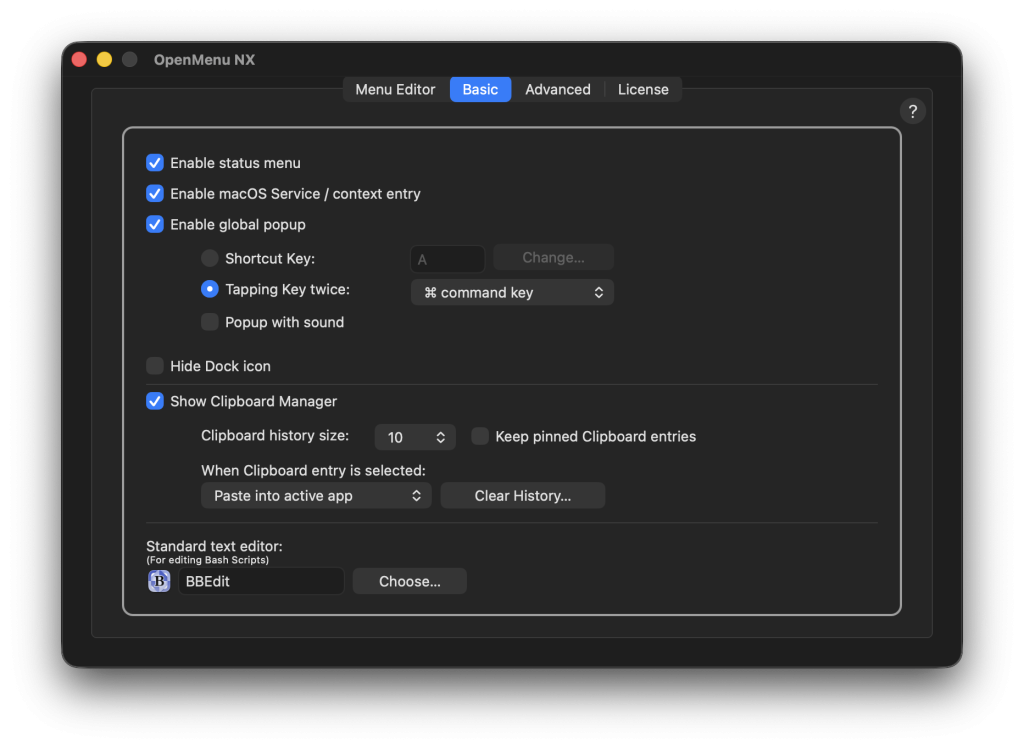
- Open the menu using the menu bar icon, a global keyboard shortcut, a double tap of a modifier key or a macOS service
- Individual keyboard shortcuts for specific menu items
- Context-sensitive menus based on selection, file type, wildcard or active application
- Actions for selected Finder items and selected text
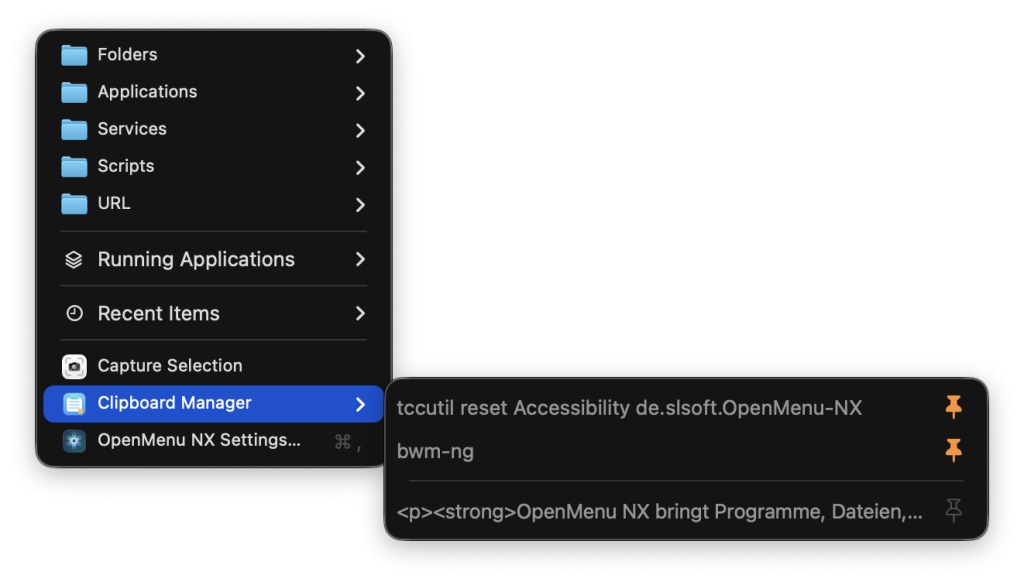
- Integrated Clipboard Manager with history, pinned entries and direct pasting
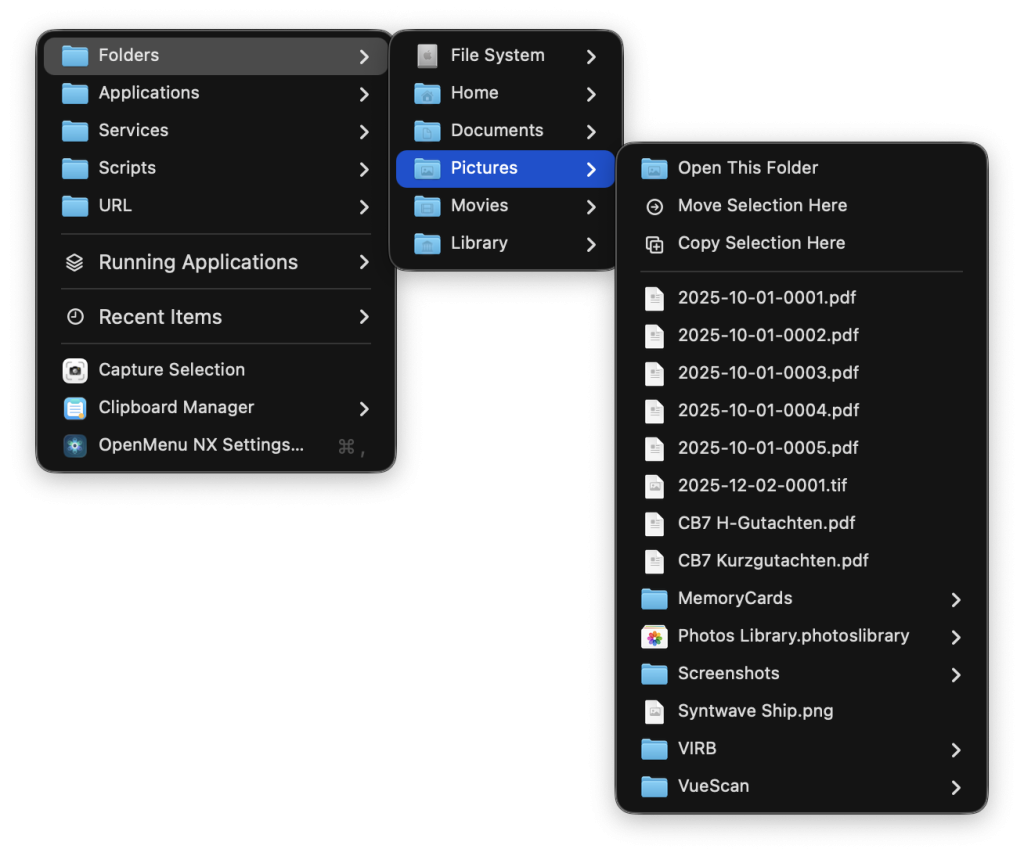
- Dynamically browse folders directly within the menu
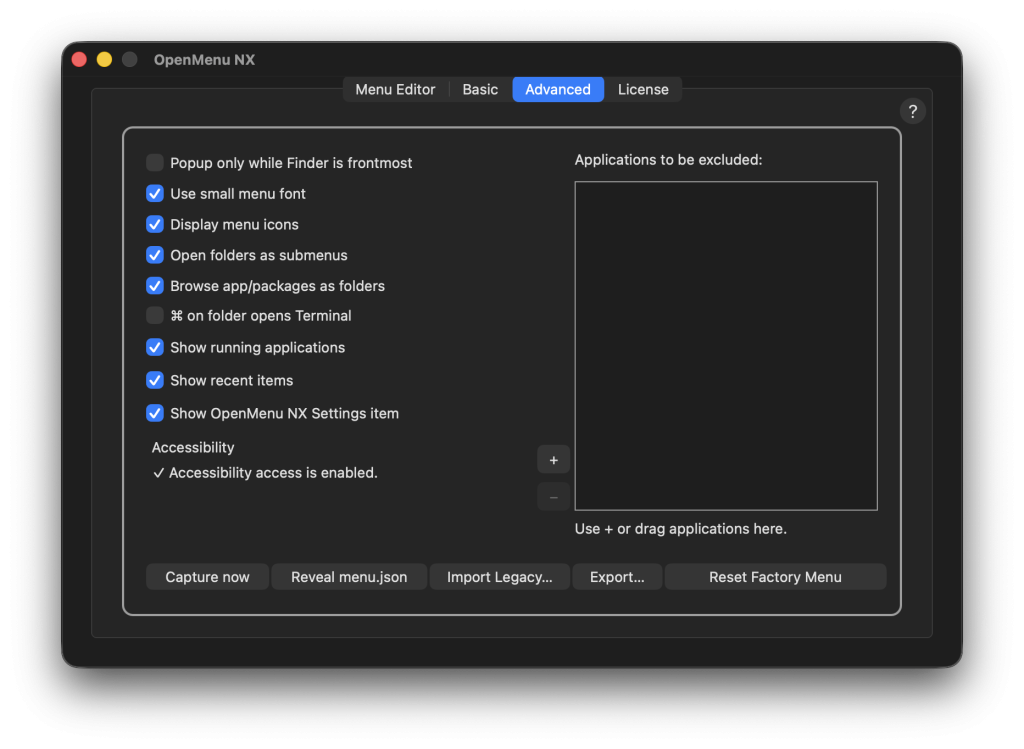
- Optional menu showing running applications and recently used items
- Dedicated script section with templates, import and direct editing
- Import, export, back up or reset your menu configuration to the included default menu
- Optional operation without a Dock icon for unobtrusive integration into macOS
- Multilingual user interface in German, English, French, Spanish and Italian
- Your configuration is stored locally – no Internet connection is required for the core features
Your Menu. Your Structure.
- Keep applications, folders, files, websites, services and scripts in one place
- Create your own groups and nested submenus
- Move and sort items using Drag & Drop
- Use separators for a clear menu structure
- Temporarily disable items without deleting them
- Assign individual keyboard shortcuts to frequently used functions
- Edit, copy, duplicate or delete multiple items at once
Right at Your Mouse Pointer
OpenMenu NX eliminates long trips through Finder, the Dock and menu bars. Your personal menu appears exactly where you are currently working.
You decide how to open it:
- With a global keyboard shortcut
- By double-tapping a freely selectable modifier key
- Using the icon in the macOS menu bar
- As a macOS service from the context menu
- Optionally only while Finder is active
Smart and Context-Sensitive
Not every menu item is needed in every situation. That is why you can define exactly when specific items should appear.
- Only when files or folders are selected
- Only when text is selected or when nothing is selected
- Only for specific file types
- With custom wildcard rules such as *.jpg oder *.pdf
- Only within specific applications
- With a global exclusion list for applications in which OpenMenu NX should not appear
This keeps your menu compact and ensures that it shows exactly the functions you need at that moment.
Work with the Current Selection
OpenMenu NX can capture the current Finder selection or selected text and pass it to applications, folders or scripts.
- Open selected files with a specific application
- Move files to a destination folder while holding the Option key
- Copy files to a destination folder while holding Shift and Option
- Reveal folders in Finder or open them directly in Terminal
- Reveal files and application packages in Finder
- Pass selected paths and text to your own scripts
Automation with AppleScript and Bash
OpenMenu NX is more than just a launcher. AppleScript and Bash scripts can be integrated directly into your menu and executed with a click or keyboard shortcut.
You can create, import and manage your own scripts and edit them directly with Script Editor or your preferred text editor. The current Finder or text selection can automatically be passed as an argument and through environment variables. Additional information such as the active application, selection type, script path and language is also available.
- AppleScript files in .scpt and .applescript
– Bash-Skripte im Format .sh, .bash and .command
- Included example scripts as a starting point
- Direct editing, revealing in Finder and reusing your own scripts
- Working directory automatically set to the folder containing the executed script
Integrated Clipboard Manager
The integrated Clipboard Manager keeps recently copied text within easy reach.
- Display clipboard history directly in the menu
- Pin important entries
- Copy entries again or paste them directly into the previously active application
- Store 10, 20 or 50 regular history entries
- Optionally keep pinned entries permanently
- Delete unpinned entries or the entire history selectively
This means frequently used text is no longer lost simply because something else has been copied in the meantime.
Browse Folders Directly
Folders do not need to be opened in Finder first. OpenMenu NX can display their contents directly as a dynamic submenu. Navigate through your directories and open files or subfolders directly from your personal menu.
If desired, application and document packages can also be browsed. Very large folders remain responsive: after the first 80 entries, an additional command takes you directly to the folder in Finder.
Running Applications and Recently Used Items
Optionally, OpenMenu NX can automatically add currently running applications and recently opened content to your menu. This lets you quickly switch between applications or return to recently used files, folders and URLs.
Import, Export and Backup
Your menu structure is stored locally. You can export it, import it again later or use it on another Mac. Compatible menu files from earlier OpenMenu configurations can also be imported. The included default menu can be restored at any time, and the configuration location can be opened directly in Finder.
Made for Your Workflow
- Fast access to frequently used content
- Flexible organization using groups and submenus
- Individual keyboard shortcuts
- Automation with scripts
- Context-sensitive actions
- Clipboard history directly in the menu
- Optional operation without a permanently visible Dock icon
Ideal For
- Users who frequently switch between applications, files and folders
- Power users who want to speed up their macOS workflow
- Developers and administrators who regularly use AppleScript or Bash scripts
- Creative users who want faster access to recurring workflows
- Anyone who prefers having important functions directly at the mouse pointer instead of scattered across the Mac
Demo and Full Version
The demo provides full access to the core OpenMenu NX experience, but includes the following limitations:
- Up to 10 user-created menu items
- One custom AppleScript and one custom Bash script
- Up to 5 Clipboard history entries and 1 pinned entry
- One wildcard rule and one application rule per menu item
- Up to 3 individual keyboard shortcuts for menu items
The full version removes these limitations. Pinned Clipboard entries can also be stored permanently. The full version can be obtained by making a donation. More information can be found in the "License" tab in OpenMenu NX.
Less searching. Less clicking. Get more done – with OpenMenu NX.
 EN
EN  DE
DE